
How Do I Delete My Zillow Account?







Are you wondering, “How do I delete my Zillow account?” Sign in to Zillow, open Account Settings, and go to the Profile tab. From there, find Manage Account, open the Privacy Portal, and choose Delete Your Data. This permanently removes your account and your data.
Zillow is a helpful and powerful tool for both homebuyers and property sellers. But it also collects and displays quite a bit of personal information — sometimes more than users realize.
Your contact information, activity and search history, and public Zillow profile can all add up. Together, they make your Zillow account a considerable contributor to your online footprint.
Maybe you want to delete or deactivate your Zillow account. Doing so limits how much personal data lives on third-party platforms and shows up in Google results. This guide covers why people take that step and walks through the exact deletion process. It also explains what to consider before you do it and how the move fits into managing your online reputation.
Do you need help cleaning up your digital presence? Call us at (844) 458-6735 for an in-depth audit and valuable insights from an expert.
Why Would You Want To Delete Your Zillow Account?
Zillow is a widely used real estate platform, but it has downsides as well as benefits. That’s especially true around data exposure and privacy.
Your home search will eventually end, but your Zillow account remains active indefinitely unless you take steps to remove it. Zillow stores your name, email address, communication activity, saved searches, and viewing history. All of that becomes part of your digital footprint, visible to varying degrees depending on who’s looking.
Here are the top reasons why someone may delete their Zillow account:
No Longer Needing the Service
Some users delete their Zillow accounts simply because they no longer need the service. Once a purchase or sale wraps up, or a transaction falls through, an unused Zillow account offers no benefit.
Privacy Concerns
Some Zillow users worry about their privacy, whether or not they still use the platform. Consider these stats from DataReportal:
- In the U.S., nearly 40% of internet users worry about how companies use their personal data online.
- Over 41% of internet users turn on ad blockers to protect their privacy online.
- More than 25% of internet users in the United States use a VPN for some online activities.
Data aggregation, data breaches, and online profiling are becoming increasingly common. It’s no surprise users worry more about what happens to their data online.
Unwanted Communication
Like many online platforms, Zillow sends users numerous alerts, notifications, and emails. These can feel intrusive, irrelevant, or just plain annoying, no matter where you are in your home search. You can adjust some notification settings. But deleting your Zillow account entirely is often the fastest way to stop the emails for good.
Online Reputation Management
Getting rid of unused accounts is a smart way to manage your online reputation. It also cuts down your exposure on the internet. Deleting a Zillow account removes your data from the platform, but it doesn’t erase every trace of you online. A public Zillow profile can sometimes stay visible even after other steps are taken.
Agents and sellers still have reason to care about reviews. People often check a Zillow profile, Google results, or a Facebook post when judging credibility. Deleting or hiding a profile doesn’t always remove public-facing property pages or all traces of your online visibility. Cutting down the number of platforms holding your personal information still helps — it gives you a better handle on where your data appears.
How you’re perceived online matters, and a poor online reputation can hurt both your personal life and your professional opportunities. Find out how to build the online reputation you deserve — call (844) 458-6735 today.
How Do I Delete My Zillow Account? Your Step-by-Step Guide
You have two options: deactivate your account temporarily, or permanently delete your data. Here’s how each works.
Getting Started: Go to Your Zillow Account Settings
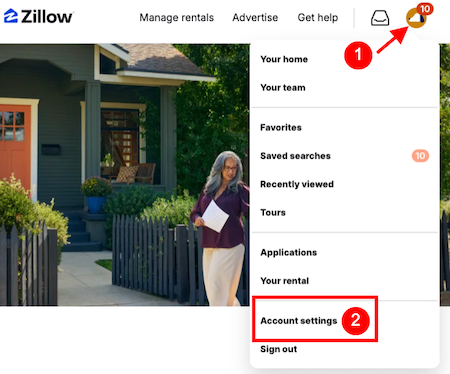
Go to the Zillow homepage and click Sign In in the upper right corner. Once you’re signed in, click the Zillow Profile Icon in the upper right corner. Then select Account Settings from the drop-down menu. If you’d like, visit your profile first and note any public details you want gone before you continue.
Option 1: Deactivate Your Account
Deactivating your Zillow account through the website removes your access to saved searches and favorited homes. Some mobile app screens hide account management options, so the website is usually easier to use. Deactivation isn’t permanent — you can reactivate your account later if you decide to return. Just note: you won’t be able to use features like mortgage applications, mortgage tools, or rental applications while your account is deactivated.
Deactivating your account also hides your Zillow profile and other information from the public, including other Zillow users. In short, this keeps your profile hidden until you choose to restore it — an important difference from permanent deletion.
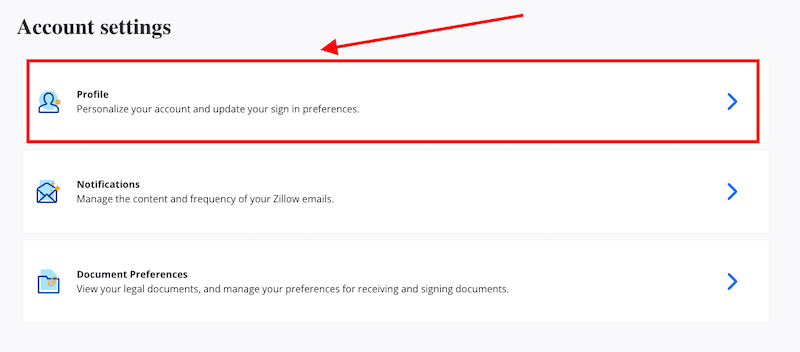
Step 1: On the Account Settings page, select the Zillow Profile tab (the first of the three options).
Step 2: Scroll to the bottom of the page, find the Manage Account section, and select Deactivate Account.
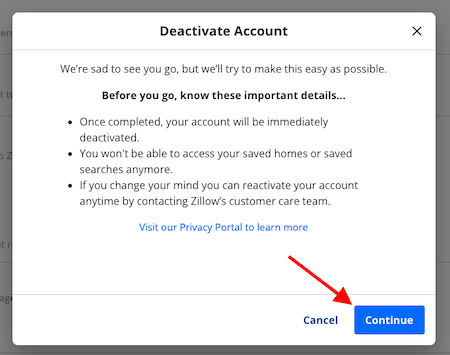
Step 3: In the pop-up window, click Continue in the bottom right. You may need to fill in brief feedback on the final screen before Zillow processes your request.
Option 2: Permanently Delete Your Zillow Data
If you’d rather remove your Zillow account for good, delete your data rather than just deactivate it. This step is permanent: you’ll lose access to your account and won’t be able to regain it.
Step 1: On the Account Settings page, select the Zillow Profile tab.
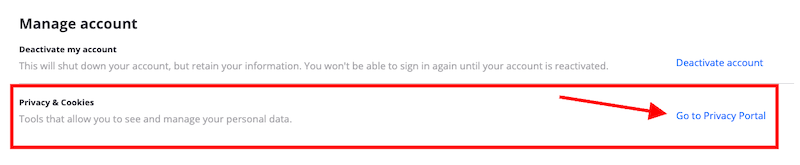
Step 2: In the Manage Account section at the bottom of the page, select Go to Privacy Portal.
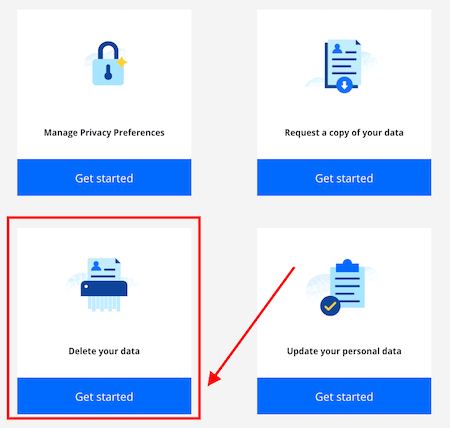
Step 3: In the Privacy Portal, scroll down to the “Delete Your Data” option and click “Get Started”.
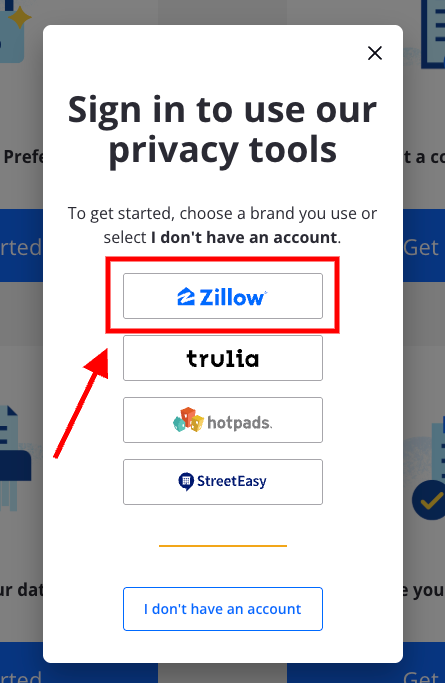
Step 4: Sign in again to access the privacy tool. Click Zillow to log in. Verify your email if prompted — Zillow needs it to confirm your identity before processing the deletion.
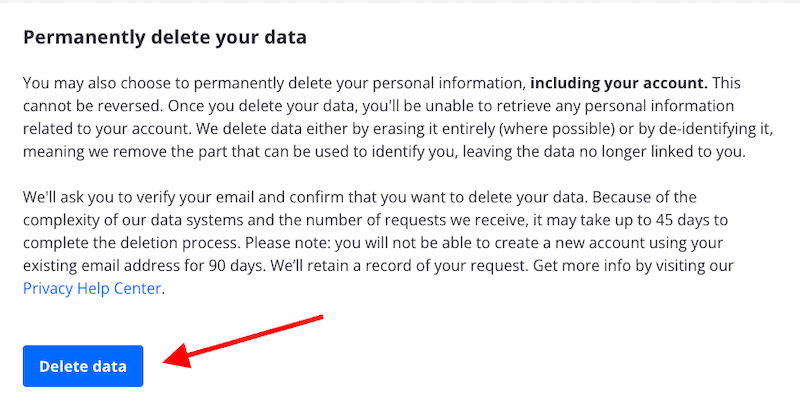
Step 5: Under the Permanently Delete Your Data section, click the blue Delete Data button.
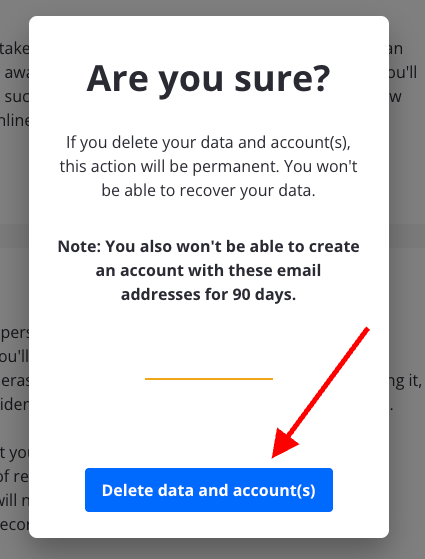
Step 6: Confirm the deletion by clicking Delete Data and Account(s) in the pop-up box.
Considerations Before Deleting Your Zillow Account and Personal Information
Keep a few important things in mind before you delete your Zillow data.
- Back up any information or documents you want to keep before you start. Once the process is done, you can’t retrieve anything.
- Cancel any active subscriptions or services through the Zillow app first to avoid unexpected charges.
- Deleting your account means losing saved searches and property alerts. Line up another way to track listings you care about first.
- Think about privacy, too. Zillow removes your personal information from its own systems. But it may still de-identify or retain some account data under its internal processes, and some public-facing references to you may not disappear right away.
Weigh these factors carefully. Once you delete your Zillow account, you can’t recover it, and Zillow permanently erases all associated history and data.
What Will Happen to Your Saved Searches and Favorites?
Deleting your Zillow account permanently erases all your saved searches and favorites. You’ll lose any listings you saved for later, along with any custom searches you built.
If you’ve put real time into curating that data, consider an alternative. Deactivate your account temporarily, or simply remove the personal information you don’t need exposed. Either option lets you step back from Zillow without losing your saved searches and favorites for good.
Take Control of Your Online Presence
Maybe you want more privacy, less unwanted communication, or a stronger handle on your online reputation. Either way, removing unused accounts keeps you in control. Deactivating or deleting your Zillow account is a small but meaningful step toward shrinking your digital footprint.
Remember, though: Zillow is just one small part of a much bigger digital landscape. Your personal data likely exists on dozens of platforms — some you may not even remember signing up for. Those platforms can surface your personal information when someone searches for your name.
Ready to truly clean up your digital presence? Work with a professional removal team to protect your online reputation. Our ORM experts offer everything from 24-hour monitoring to content creation and promotion, helping you build the online presence you deserve. Call (844) 458-6735 for a free consultation.
