
BeenVerified Opt-Out Guide To Remove Personal Information Online








This BeenVerified opt-out guide will help you keep your sensitive information and public records safe online.
Are you concerned about your online privacy? Our expert guide on how to opt out of BeenVerified covers everything you need to know about removing your information from this and other data broker sites.
Learn what can be removed from search results and explore additional strategies to safeguard your digital footprint. Stay informed and take control today.
Do you need help protecting your digital presence on people search sites? Call us at (844) 458-6735 for an in-depth audit and valuable insights from an expert.
Key Takeaways
- Opting out of BeenVerified can help protect your privacy and online reputation.
- The opt-out process includes finding your profile, submitting a request, verifying your identity, and waiting for confirmation.
- If you can’t opt out of BeenVerified, consider limiting your online presence and using privacy settings on social media to protect your personal information.
What Is BeenVerified?
BeenVerified is a consumer reporting agency that provides access to personal information online.
By offering various services, including comprehensive background checks, BeenVerified allows users to uncover crucial details about individuals through its database, which compiles detailed profiles from public records, social media profiles, and other sources. This platform has become a top choice for those looking to verify someone’s identity or conduct due diligence for various reasons, such as making hiring decisions or ensuring dating safety.
The people search feature of BeenVerified enables individuals to reconnect with long-lost friends or family members by simply entering a name and location. This convenient tool taps into various databases to provide accurate, up-to-date contact details, making it easier to stay connected with loved ones. BeenVerified updates its database regularly with new public records.
Why Would Someone Want To Opt Out of BeenVerified?

Individuals may opt out of BeenVerified to protect their personal info from being readily available on the site through data brokers and people search platforms.
Privacy and data security concerns are paramount in today’s digital age. With the proliferation of data breaches and the ongoing collection of personal information by various platforms, many individuals are becoming increasingly aware of the risks of exposing their private data, including identity theft.
Almost 40% of internet users in the U.S. are worried about how companies use their personal data online. In 2023, over 880,400 internet scam complaints were received, resulting in $12.5 billion in losses.
Opting out of data broker sites is a proactive step toward safeguarding one’s privacy, and removing records from BeenVerified can also limit the risk of identity theft.
Privacy is a fundamental right that many believe should not be compromised for convenience or public access. By taking control of the information available about them online, individuals are asserting their autonomy and their right to data protection.
How To Opt Out of BeenVerified
We’ll go through these steps one by one, but here’s a brief overview:
To opt out of BeenVerified, fill out their provided opt-out form with accurate personal details, including your name, email, and phone number. After submission, verify your identity through an opt–out verification email.
Removal from the database typically takes a few days. Keep an eye out for further updates in your email.
Step 1: Find Your Profile
The first step to opt out of BeenVerified is to locate your profile on the platform, which may contain personal details and search results.
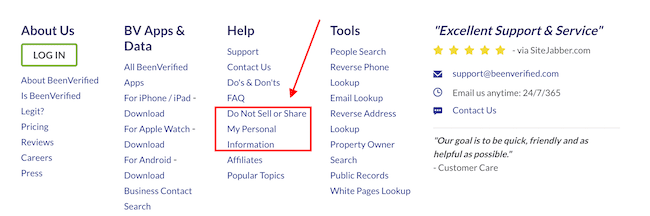
Once you are on the BeenVerified website, scroll to the footer to find the opt-out form link. Click the link that says Do Not Sell or Share My Personal Information.
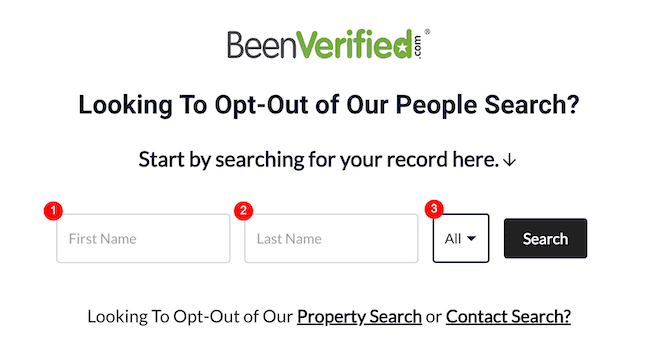
Begin by entering your first and last name in the search bar. This will generate a list of potential profiles matching the criteria. Click on the profiles to view their details, including prior addresses, contact information, and criminal records.
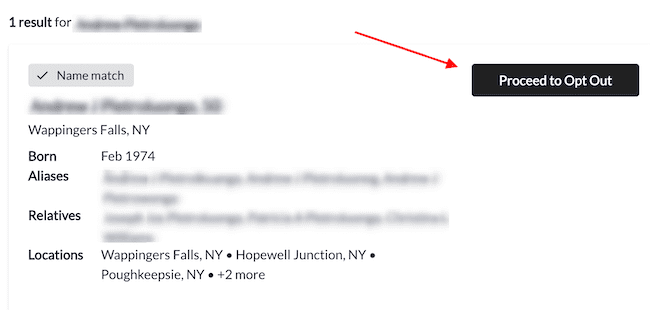
It is crucial to verify that the account information displayed is indeed yours by cross-referencing with your records. Review the listed details carefully to identify the correct record before opting out.
Step 2: Submit an Opt-Out Request
Once you have found your BeenVerified profile, submit an opt-out request to initiate removal. Click the Proceed to Opt Out button to the right of the result.
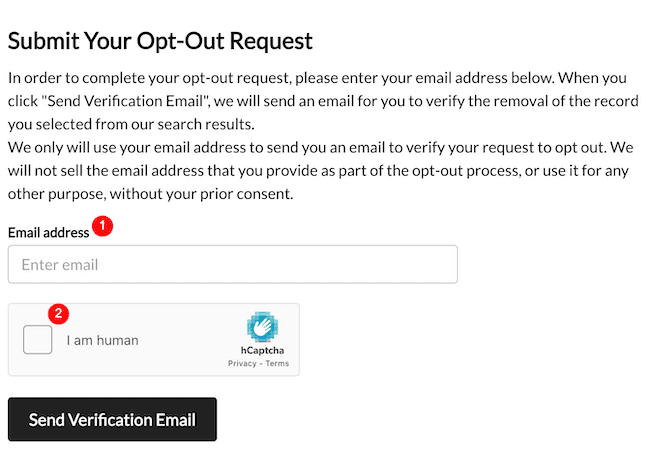
Next, enter your email address, complete the CAPTCHA verification by clicking the I am human box, and then hit the Send Verification Email button. BeenVerified does not charge for the opt-out process, and removal requests are processed at no cost to users.
Step 3: Verify Your Identity
After submitting the opt-out request, open the verification email from BeenVerified and confirm the request by clicking the green Verify Opt-Out button.
Once verification is confirmed, BeenVerified usually processes the request within 48 hours, though opt-out requests may take 24 to 72 hours.
This step is crucial to ensure that the opt-out request is genuine and authorized by the correct individual. Identity verification helps maintain the security of your personal information and public records.
Step 4: Wait for Confirmation
Once the verification process is complete, BeenVerified will send you a confirmation message via email. Check your spam or junk folder if you don’t find the verification email in your inbox.
This notification is crucial in ensuring your personal data has been successfully removed from their system. It’s essential to watch for this confirmation, as it shows that the opt-out process is complete. Confirmations like these provide reassurance and peace of mind, knowing your privacy has been respected.
Full removal from all servers can take up to 7 business days after verification.
What Are the Alternatives to Opting Out of BeenVerified?
In addition to opting out of data brokers and people search sites like BeenVerified, individuals can consider alternatives such as limiting their online presence, utilizing privacy settings on social media platforms, and monitoring their online reputation.
Maintaining your online privacy goes beyond just opting out of a single service. One effective strategy is consciously controlling the information you share on various online platforms. By being mindful of what you post, you can limit the digital footprint you leave behind.
Taking advantage of the privacy settings available on social media sites can significantly enhance your data protection. It is essential to review these settings regularly to ensure you are safeguarding your personal information effectively.
Additionally, monitoring your online reputation is crucial for staying informed about how you are portrayed online and taking steps to address any harmful content that may impact your image.
Get started today with online reputation management or repair. Give us a call at to learn more.
Limit Your Online Presence
Limiting your online presence involves minimizing the personal information available online and reducing the digital footprint that data brokers like BeenVerified can access.
Reducing exposure across other online sources can also help you better manage your privacy.
One effective strategy to achieve this is to review the privacy settings on your social media accounts, ensuring that only close friends and family can view your personal details. Another crucial step is to be cautious about what information you share online, refraining from posting sensitive data such as your address, phone number, or financial details.
Regularly monitoring your online accounts for unauthorized access or suspicious activity can also help you maintain a lower profile. By being selective about the platforms you engage with and the data you disclose, you can significantly enhance your online privacy and safeguard your personal information from prying eyes.
Use Privacy Settings on Social Media

Leveraging privacy settings on social media platforms allows individuals to control the visibility of their personal information and restrict access to data brokers like BeenVerified.
By adjusting these settings, users can ensure that their posts, photos, and personal details are only visible to those they choose. It’s essential to regularly review and update these settings to adapt to changing preferences and circumstances.
One critical step in enhancing privacy and preventing identity theft is managing who can view your profile and posts. Restricting who can see your content can prevent potential misuse and protect your online identity.
Monitor Your Online Reputation
Regularly monitoring your online reputation lets you stay informed about search results for your name. You’ll then be able to take necessary actions to address any privacy concerns or inaccuracies.
Proactively managing your online visibility helps safeguard your personal data and maintain a positive digital presence.
Individuals can promptly respond to damaging content or misleading information that may affect their reputation by actively monitoring social media platforms, search engine results, and review sites. Utilizing online monitoring tools can streamline this process, alerting you to any changes or mentions of your name online and allowing you to address issues promptly. By staying vigilant and actively managing their online presence, individuals can protect their privacy and reputation effectively.
Our team of ORM experts provides around-the-clock monitoring of your personal information. Contact us at (844) 458-6735 for more information.
Frequently Asked Questions
What information can I have removed from BeenVerified?
When opting out of BeenVerified and other data brokers, listings may include phone numbers, addresses, and other information in a person’s profile, often sourced from public records and third-party providers. This can cover details such as employment history, residential phone numbers, previous job roles, and addresses, helping limit sensitive information in public view. New records may be created if data partners provide updated information, and you can request removal again if new records appear after opting out.
How long does it take for information to be removed from BeenVerified?
The timeframe for removing information from data brokers varies based on data complexity, request accuracy, and workload, but removal is often completed within a few days—commonly 24 to 72 hours—with some requests processed in about 48 hours after verification under the relevant policy article. Some users may see removal within days, while others may take longer.
Simple removal requests meeting all criteria are typically processed faster, while those needing further verification may take more time. BeenVerified’s internal processes and removal team’s workload also affect removal speed. According to its policies, BeenVerified may retain personal data for up to 10 years after account closure.
Are there any other ways to remove information from BeenVerified?
Individuals seeking to remove their information from BeenVerified can consider various methods beyond the standard opt-out process.
Directly contacting BeenVerified allows for swift resolution through their customer support channel, and a request may also be submitted by another person acting on your behalf. Engaging with the website hosting the information provides another avenue for removal requests. Alternatively, hiring professional ORM services means hiring experts who can handle the process for you.
The effectiveness of each method varies based on the responsiveness of involved parties, including website operators, support providers, or a business handling privacy requests, and data complexity.
Contact Our Content Removal Experts Today
We work with clients who are ready to create, grow or repair their digital reputation. Whether you’re prioritizing your personal or professional online reputation, our tailored services can help.
We offer a range of ORM services, including review monitoring, content removal and more. Our strategy includes auditing, repair, monitoring and management.
The way you’re perceived online matters. A poor online reputation can damage your personal life and your professional opportunities.
Find out how to create the online reputation you deserve by calling (844) 458-6735 today.
